
Bromcom
Bromcom My Child At School (MCAS)

General information, newsletters and trip messages are communicated to parents and carers via email. Please add the school's communications email address - [email protected] - to your safe sender list to ensure these arrive in your inbox and don't get filtered by your provider as spam. We also use a secure online system from Bromcom called My Child At School (MCAS) to keep you up to date.
Save money by downloading the MCAS app
If you have a smartphone, both you and the school can save money when you download the 'MCAS' app from your app store (Android and iPhone).



We’re aiming to get all parents and carers using the app – please help us achieve this.
Once you’ve downloaded the app, our texts will be delivered to you as instant app messages, saving us the cost of texting. Please ensure you enable notifications for the app. Any messages that you send to school using the app will be FREE of charge to you.
It’s quick and easy to do. Once your child is on roll, an account will be generated for contacts with parental responsibility and who have an email address on our records. A system-generated email (example below) will be sent to this address. Please remember to check your spam/junk folder if the email is not in your inbox.
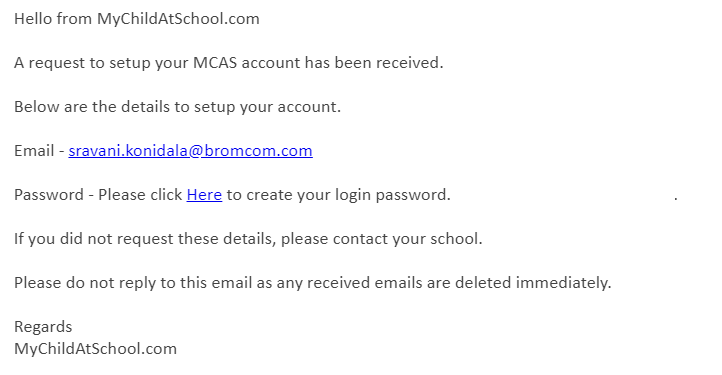
Click on the link in the email to create your login password. You'll be directed to enter and confirm your password before clicking the create password button.
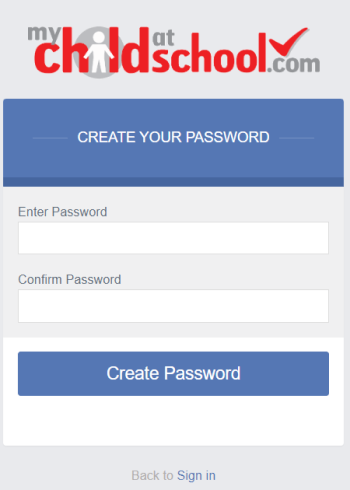
And that's it!
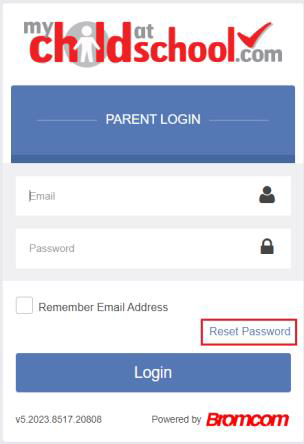
If your child has been on roll for a while but you haven't yet activated your MCAS account you can use the reset your password link to set up and access your account.
If you have any issues please refer to the MCAS Parent Guide, a copy of which is available by clicking the link below, or contact Reception - [email protected]